Every manifest in this series has reached the cluster the same way:
kubectl apply -f app.yamlA file on somebody’s laptop, and a command that sends it. The API server accepted it because the kubeconfig on that laptop said it could. It has no idea which file it came from, which branch, or which commit.
That holds up until two people are doing it. Then until somebody hotfixes a live Deployment at 2am and forgets to commit the change. Then until you need to answer “what is running in production right now”, and the honest answer is “whatever the last person applied”.
This post replaces that command with a git repo. Argo CD runs inside the cluster, watches a repository, and makes the cluster match it. Then we automate the repository, so that pushing application code ends with new pods running, and nobody types kubectl at all.
1. Push and pull
What we have been doing is the push model. Something outside the cluster holds credentials and writes to the API server.
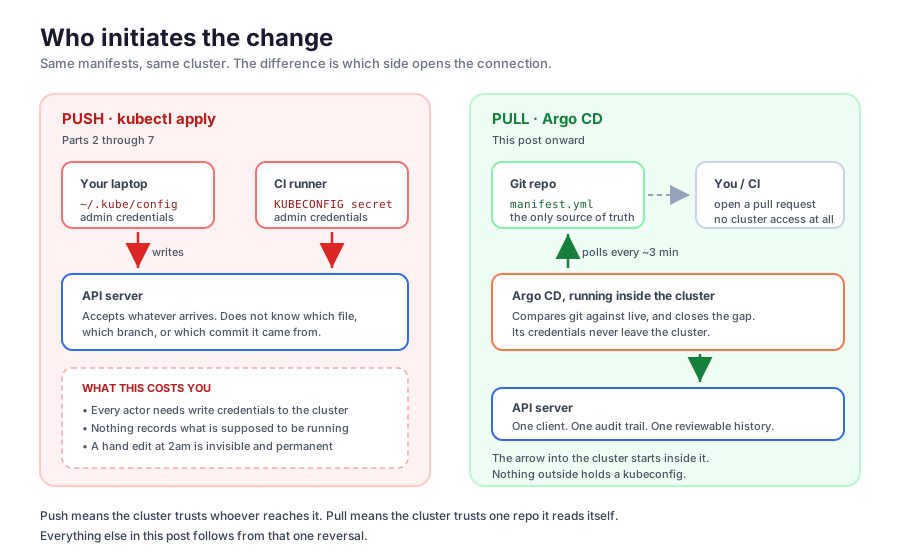
Three things follow from that arrow pointing inward.
Credentials spread. Every laptop and CI runner that deploys needs write access to the cluster. A CI system that can deploy is a CI system that can delete your namespace, and CI systems run other people’s pull requests.
There is no desired state. The cluster holds a live state, git holds some YAML, and nothing checks that they agree.
Drift is silent. kubectl scale deploy/api --replicas=10 during an incident is the right move at the time. It also exists in exactly one place, and survives until some later deploy quietly undoes it.
The pull model reverses the arrow. An agent inside the cluster reads a repo and applies what it finds. The repo becomes the answer to “what is supposed to be running”, not by convention but because it is the only input. Humans open pull requests. The cluster’s credentials never leave the cluster.
That idea is what people mean by GitOps: the desired state is declarative, it lives in git, an agent pulls it rather than being pushed at, and the agent keeps comparing forever instead of applying once.
2. What Argo CD is
Argo CD is a Kubernetes controller that does exactly that. It runs as a handful of pods in an argocd namespace, and it adds one custom resource you will care about, the Application.
An Application says: this repo, this path, this branch, goes into this cluster, in this namespace. Argo CD holds that promise open indefinitely.
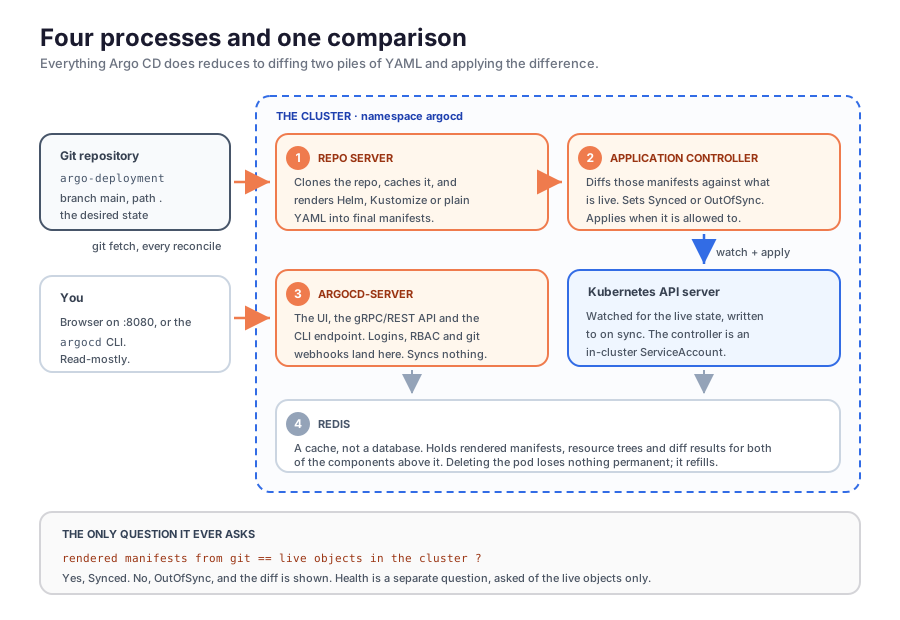
Four pods matter:
| Pod | Job |
|---|---|
argocd-repo-server | Clones the repo and renders whatever it finds into plain manifests. Helm charts, Kustomize overlays, a directory of YAML |
argocd-application-controller | Compares those manifests against the live objects, decides Synced or OutOfSync, and applies the difference when allowed to |
argocd-server | The web UI, the API, and the endpoint the argocd CLI talks to. It syncs nothing itself |
argocd-redis | A cache. Deleting it loses nothing permanent |
Everything reduces to one question, asked in a loop: do the manifests rendered from git match the objects that are live?
3. Installing it on DigitalOcean
DigitalOcean’s Marketplace has an Argo CD entry, and on a DOKS cluster it is the shortest path. In the control panel:
- Open Kubernetes and click your cluster.
- Go to the Marketplace tab.
- Find Argo CD and click Install.
It takes a couple of minutes. For a cluster that does not exist yet, the Marketplace listing has a Launch App button that lets you create one with Argo CD already on it, and the cluster creation page has a 1-Click apps section where you can tick it before the cluster is built.
Check what landed:
kubectl get pods -n argocdNAME READY STATUS RESTARTS AGE
argocd-application-controller-0 1/1 Running 0 2m
argocd-applicationset-controller-59496dddbf-6zts8 1/1 Running 0 2m
argocd-dex-server-bc7645bb4-x4w5k 1/1 Running 0 2m
argocd-notifications-controller-756bc985-bgs2p 1/1 Running 0 2m
argocd-redis-548fbb679d-chgk7 1/1 Running 0 2m
argocd-repo-server-7b455bd4bb-sjc84 1/1 Running 0 2m
argocd-server-7ff47f4c78-hbbcm 1/1 Running 0 2mIf you are not on DigitalOcean, the upstream install is one command:
kubectl create namespace argocd
kubectl apply -n argocd --server-side --force-conflicts \
  -f https://raw.githubusercontent.com/argoproj/argo-cd/stable/manifests/install.yaml
--server-side is not optional. The CRDs in that file are too large for client-side apply and you get a confusing metadata.annotations: Too long without it.
4. Getting in
The admin password is generated at install and left in a Secret:
kubectl -n argocd get secret argocd-initial-admin-secret \
  -o jsonpath="{.data.password}" | base64 -d; echo
There is no Ingress on this install, so reach the UI by forwarding a port:
kubectl port-forward svc/argocd-server -n argocd 8080:443Open https://localhost:8080. The browser will object to the certificate, which is correct of it, since Argo CD generated a self-signed one at install. Accept it and log in as admin.
The landing page is the Applications dashboard. Yours is empty right now, so here is one with things in it:
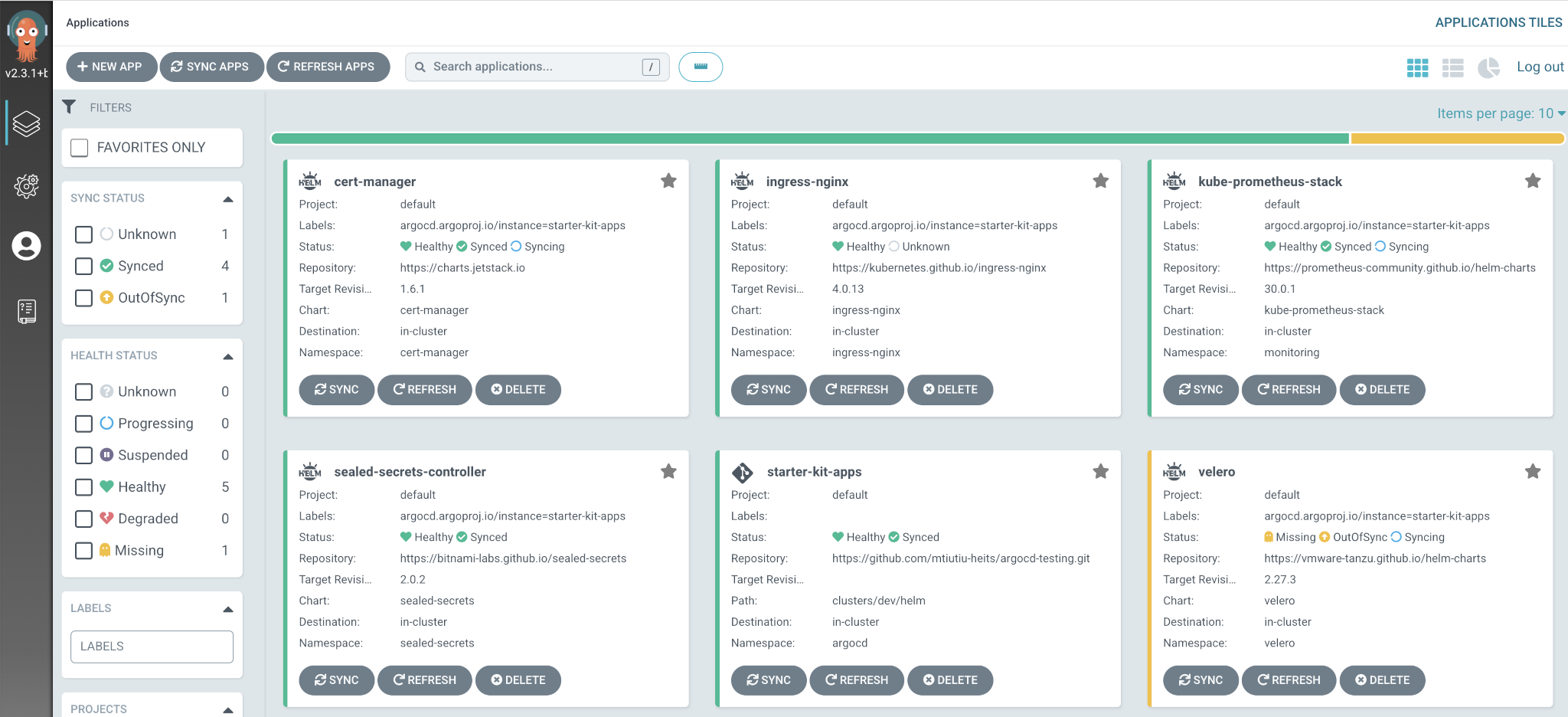
The Applications dashboard. Screenshot from the DigitalOcean marketplace-kubernetes docs, Apache 2.0.
Each tile carries two statuses, and they answer different questions.
Sync status compares git to the cluster: Synced or OutOfSync. Health status ignores git entirely and asks whether the live object is working: Healthy, Progressing, Degraded, Missing. In the screenshot, velero is Missing and OutOfSync while ingress-nginx is Healthy and Unknown.
The combination that catches people is Synced and Degraded. Argo CD did everything right, the manifest in git is exactly what is live, and the container still will not start. A green sync tick is a statement about YAML, not about your application.
You will also want the CLI (brew install argocd):
argocd login localhost:8080 --username admin --password <password> --insecure5. The first Application
We will point Argo CD at a repo that already exists, github.com/dheerajsai15/argo-deployment. It holds one file.
# manifest.yml
apiVersion: v1
kind: Pod
metadata:
  name: next-app
spec:
  containers:
  - name: next-app
    image: dheerajsai15/todo-app-argocd:158f00199dd5ea1618b87cfd9a3d87d1d6ef41ce
    ports:
    - containerPort: 80
The interesting part is the tag, which is a git commit SHA that a robot put there. Section 6 builds the robot.
In the UI: NEW APP, then fill in the form.
| Field | Value |
|---|---|
| Application Name | todo-app |
| Project Name | default |
| Sync Policy | Automatic, with self heal ticked |
| Repository URL | https://github.com/dheerajsai15/argo-deployment.git |
| Revision | main |
| Path | . |
| Cluster URL | https://kubernetes.default.svc |
| Namespace | default |
Path is a directory inside the repo, and . means the root. Cluster URL is the in-cluster Kubernetes Service, so Argo CD is deploying to the cluster it runs in.
Click CREATE. Within a few seconds:
argocd app get todo-appName: argocd/todo-app
Repo: https://github.com/dheerajsai15/argo-deployment.git
Target: main
Sync Policy: Automated
Sync Status: Synced to main (d21deba)
Health Status: Healthy
GROUP KIND NAMESPACE NAME STATUS HEALTH MESSAGE
Pod default next-app Synced Healthy pod is readySynced to main (d21deba) names the exact commit. Every decision Argo CD makes is traceable to a SHA.
kubectl get podsNAME READY STATUS RESTARTS AGE
next-app 1/1 Running 0 25sNo manifest ever touched your filesystem.
The two checkboxes under Sync Policy
Setting the policy to Automatic syncs whenever git changes. The two boxes under it are both unticked by default and do more than they look like they do.
- SELF HEAL syncs when the cluster drifts, not just when git changes. Delete the pod and Argo CD puts it back within about five seconds. Note what it does not do: it does not stop you deleting the pod. The API server accepts your command, the pod really is gone, and Argo CD notices afterwards and recreates it.
- PRUNE RESOURCES lets a sync delete. Without it, removing a manifest from git leaves its object running forever. With it,
git rmis a deployment action, so think about what a bad rebase does before ticking it on a production repo.
One consequence of automated sync: the HISTORY AND ROLLBACK button in the UI stops working, because a rollback would be dragged forward again on the next reconcile. Under GitOps you roll back with git revert, and that is the intended answer rather than a workaround.
The application view
Clicking the tile opens the resource tree, with the Application on the left and everything it created fanning out to the right, each node carrying its own sync and health icons.
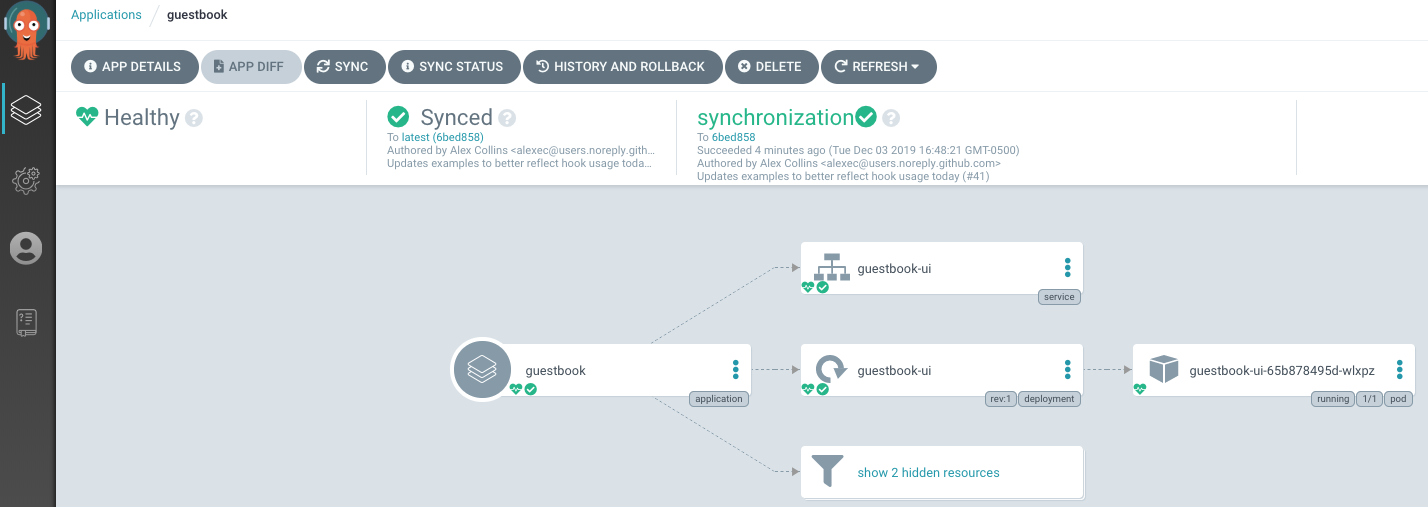
The application view, with a richer app than ours. Screenshot from the Argo CD docs, Apache 2.0.
The header buttons you will actually use: APP DIFF shows live against desired field by field, and REFRESH re-reads git now rather than waiting for the poll, which by default runs every two to three minutes. Clicking any node in the tree gives you its YAML, its events and its logs.
6. Automating the repo
Argo CD deploys whatever is in argo-deployment. Nothing yet puts new versions there. That is the job of GitHub Actions in the application repo, github.com/dheerajsai15/todo-app-argoCD, a Next.js app with a Dockerfile.
Why two repos
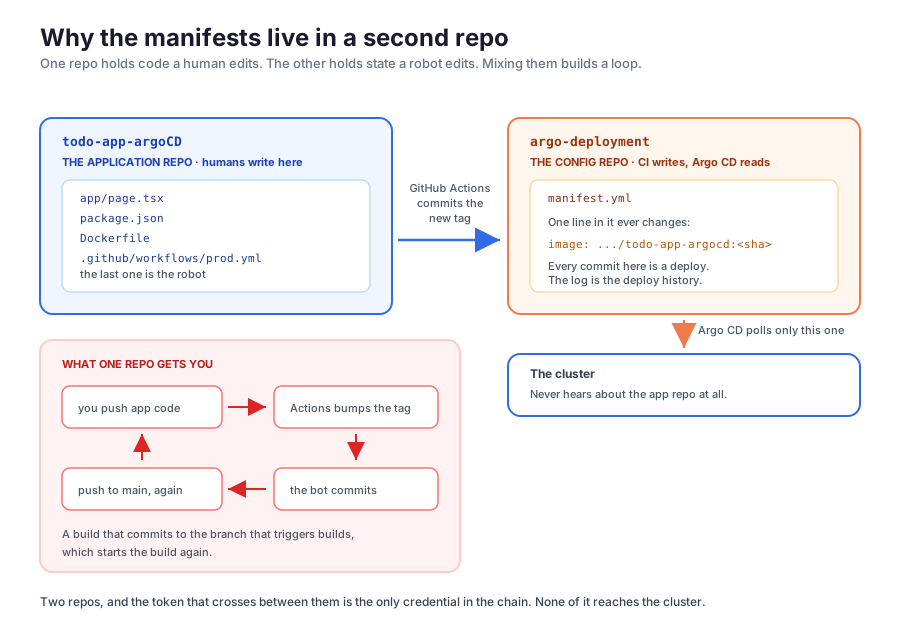
The obvious layout is one repo with a k8s/ directory in it, and it does not work.
A single repo builds a loop. The workflow triggers on push to main, and the workflow commits to main, which triggers the workflow. With two repos the question never comes up, because argo-deployment has no workflows at all.
Different writers, different rates. One repo is edited by people in reviewed pull requests. The other is edited by a robot, one line at a time, on every merge. Keeping them apart means git log on argo-deployment is the deployment history, and git revert on it is a rollback.
The workflow
.github/workflows/prod.yml in the application repo:
name: Continuous Deployment (Prod)

on:
  push:
    branches: [ "main" ]

jobs:
  build-and-deploy:
    runs-on: ubuntu-latest
    steps:
      - uses: actions/checkout@v4

      - name: Docker login
        uses: docker/login-action@v3
        with:
          username: ${{ secrets.DOCKER_USERNAME }}
          password: ${{ secrets.DOCKER_SECRET }}

      - name: Set up Docker Buildx
        uses: docker/setup-buildx-action@v3

      - name: Build and push image
        uses: docker/build-push-action@v6
        with:
          context: .
          push: true
          tags: dheerajsai15/todo-app-argocd:${{ github.sha }}

      - name: Update the deployment repo
        env:
          PAT: ${{ secrets.PAT }}
        run: |
          git clone https://github.com/dheerajsai15/argo-deployment.git
          cd argo-deployment

          sed -i 's|image: dheerajsai15/todo-app-argocd:.*|image: dheerajsai15/todo-app-argocd:${{ github.sha }}|' manifest.yml

          git config user.name "GitHub Actions Bot"
          git config user.email "actions@github.com"
          git add .
          git diff --cached --quiet || git commit -m "Deploy ${{ github.sha }}"
          git push https://${PAT}@github.com/dheerajsai15/argo-deployment.git main
Two halves. The first builds an image and pushes it to Docker Hub. The second clones the other repo, rewrites one line, and pushes.
The sed uses pipes as delimiters because the pattern is full of slashes. It matches from image: to the end of the line, so the leading indentation is outside the match and survives untouched. That is why the same line keeps working if you later move the image into a Deployment and it sits ten spaces deep instead of four.
git diff --cached --quiet || is there because git commit exits non-zero when nothing is staged, which would fail the job on any re-run of an unchanged commit.
Why the tag is a commit SHA
This is the one decision that makes the whole thing work.
Tag the image latest instead, and after CI pushes the new image the manifest in the deployment repo still reads:
image: dheerajsai15/todo-app-argocd:latestUnchanged. Argo CD renders the repo, diffs it against the cluster, finds them identical, and reports Synced. It is correct. Nothing in the desired state changed, and your new code sits in the registry forever.
A SHA tag fixes it because the tag itself is what changes:
- image: dheerajsai15/todo-app-argocd:158f00199dd5ea1618b87cfd9a3d87d1d6ef41ce
+ image: dheerajsai15/todo-app-argocd:a7c3f91b2d8e4056cb1f7a92e3d48f6019bc5d7a
Two things come free with it.
The new image actually gets pulled. imagePullPolicy decides whether the kubelet asks the registry before starting a container or reuses a copy the node already has on disk, and it defaults to IfNotPresent for every tag except latest. So a node that has seen the tag before will use its cached copy without checking for a new one. That is a trap with a tag like v1 or staging that you overwrite on every build: a node that pulled v1 last week keeps running last week’s binary, while a node that has never seen v1 pulls today’s, and the same tag is now two different programs on two machines. A SHA tag has never existed before this build, so no node can have it cached, and that path never happens.
Every pod names the commit that built it. kubectl get pod <name> -o jsonpath='{.spec.containers[0].image}' gives you a hex string that is a commit in the application repo, so going from a running pod back to its source is one git show.
The three secrets
Under Settings → Secrets and variables → Actions in the application repo:
| Secret | What it is |
|---|---|
DOCKER_USERNAME | Your Docker Hub username |
DOCKER_SECRET | A Docker Hub access token, from Account settings → Personal access tokens. Not your password |
PAT | A GitHub token that can push to argo-deployment |
Make the PAT a fine-grained one: repository access limited to argo-deployment alone, and a single permission, Contents: Read and write. The classic-token equivalent is the repo scope, which grants write access to every repository your account can reach, so do not use one here. Set an expiry too. It means the pipeline breaks one morning in December, which is the feature.
7. The full run
Edit app/page.tsx, commit, push to main.
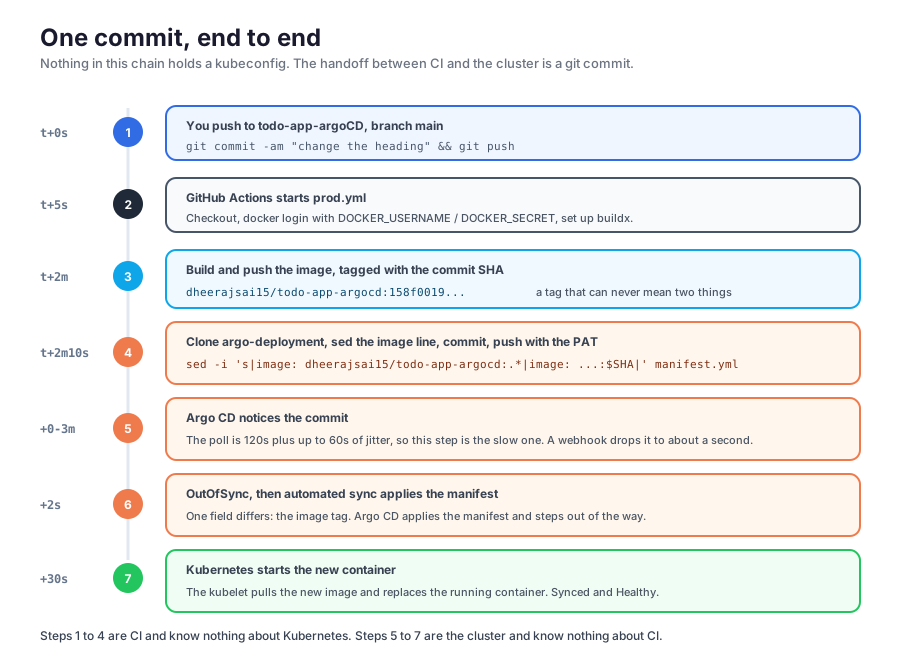
The commit that lands in the other repo is the interesting artefact:
git -C argo-deployment pull
git -C argo-deployment log --oneline -3
4f2a91c Deploy a7c3f91b2d8e4056cb1f7a92e3d48f6019bc5d7a
d21deba Deploy 158f00199dd5ea1618b87cfd9a3d87d1d6ef41ce
aafa5cf Added manifestThat log is your deployment history. Argo CD picks it up on its next poll:
argocd app get todo-app --refreshSync Status: Synced to main (4f2a91c)
Health Status: HealthyAnd from there it is ordinary Kubernetes:
kubectl get pods -wNAME READY STATUS RESTARTS AGE
next-app 1/1 Running 0 6m
next-app 0/1 Running 1 (2s ago) 6m
next-app 1/1 Running 1 (12s ago) 6mSame pod, new container. The manifest in the repo is a bare Pod, so there is no ReplicaSet and no rolling update: the kubelet pulls the new image, kills the old container and starts the new one in place. Make it a Deployment and you get Part 2’s rolling update instead, which is what you want in production.
The UI shows the same thing as a tree:
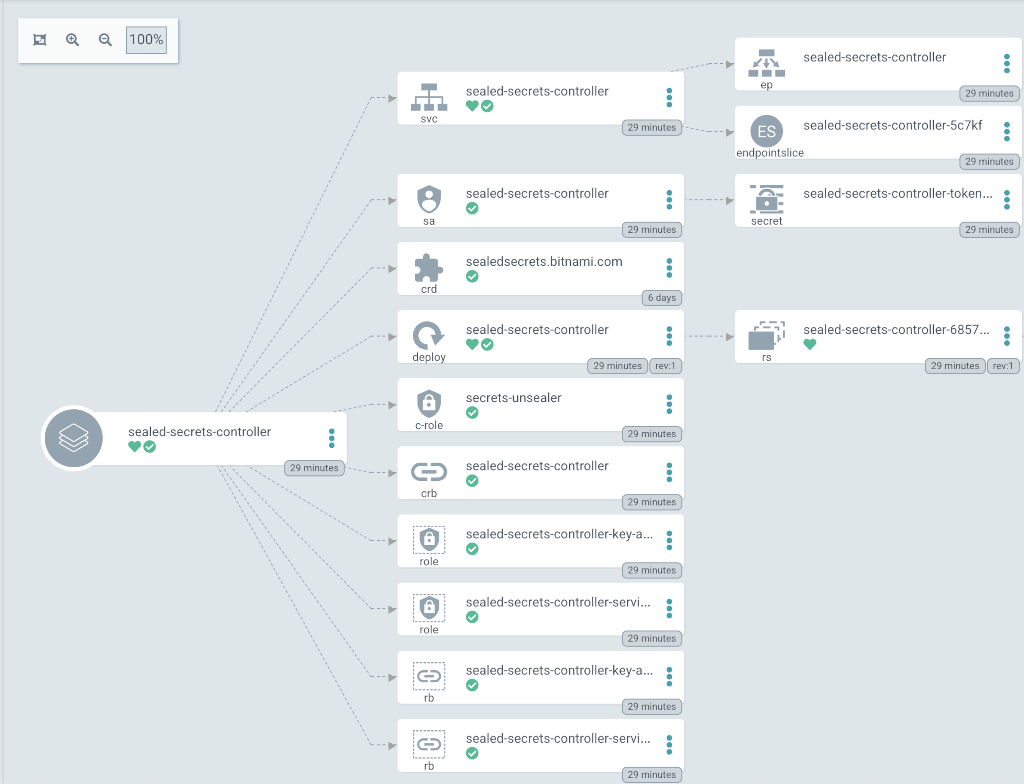
The resource tree, on an app with more objects than ours. Screenshot from the DigitalOcean marketplace-kubernetes docs, Apache 2.0.
Push to serving is roughly three to five minutes, and the largest single chunk is Argo CD waiting for its next poll. A git webhook pointed at https://<your-argocd-host>/api/webhook removes that wait, though it needs argocd-server reachable from GitHub, so put the Ingress from Part 4 in front of it first. It is worth understanding that the webhook is an optimisation and not a mechanism: turn it off and everything still works, three minutes later.
Wrapping up
Where we landed:
- Push means the cluster trusts whoever reaches it. Pull reverses the arrow: an agent inside the cluster reads a repo, so the repo is the desired state by construction and the cluster’s credentials never leave it.
- Argo CD is four pods and one comparison. Do the manifests rendered from git match the objects that are live?
- An Application names a repo, a path, a branch, a cluster and a namespace. That is the whole configuration, and the NEW APP form is all it takes to write one.
- Sync and health are independent. Sync compares git to the cluster; health looks only at the live objects.
SyncedplusDegradedmeans Argo CD worked and you shipped a bug. selfHealreverts drift, it does not prevent it, and turning on automated sync disables the rollback button. Roll back withgit revert.- Two repos, because one builds a CI loop: a workflow that commits to the branch that triggers it. A fine-grained PAT scoped to
Contents: Read and writeon exactly one repository is what lets CI cross between them. - The image tag must be immutable and unique per build.
${{ github.sha }}does it.latestbreaks GitOps outright, because the manifest never changes, so Argo CD is right to reportSyncedand never deploy your code. - The config repo’s
git logis the deployment history. Every commit in it is a deploy, naming the exact image that went out, andgit reverton it is a rollback.
Cleanup:
argocd app delete todo-app
kubectl delete namespace argocd
Then destroy the cluster. Nothing here created a load balancer or a volume, so unlike Parts 4 and 6 there is nothing orphaned to hunt down on your invoice.
That is the series
Eight posts ago this started with a single pod, applied by hand, on a cluster running on a laptop. It ends with a system where nobody applies anything. You edit source, open a pull request, and merge it. A runner builds an image nobody names, a bot writes one line into a repo nobody reads by hand, and a controller inside the cluster notices and closes the gap. The answer to “what is running in production” is a git log.
The arc, in one line each: the anatomy of a cluster in Part 1, pods and ReplicaSets and Deployments in Part 2, Services in Part 3, Ingress in Part 4, ConfigMaps and Secrets in Part 5, PersistentVolumes and claims in Part 6, requests and limits and the HPA in Part 7, and GitOps here.
Kubernetes is a far larger surface than eight posts can cover, and plenty got left out. What is here is the part you touch on an ordinary day. Almost every application running on almost every cluster is some arrangement of a Deployment, a Service, an Ingress, a ConfigMap, a Secret, a volume and a replica count, with something watching a repo to keep it that way. The rest is what you reach for when a specific problem asks for it, and by then you will know which problem you have.
Thanks for reading, if you made it this far.