Across the last four posts we quietly did something that would get flagged in any real code review. In Part 3 we wrote a database password directly into a pod manifest:
env:
  - name: POSTGRES_PASSWORD
    value: "learning-only"
And then we did it again, worse, in a connection string:
env:
  - name: DATABASE_URL
    value: "postgres://postgres:learning-only@db:5432/postgres"
That was fine for learning. But it leaves us with a manifest that can’t be committed to a repository, can’t be reused between staging and production, and hands the password to anyone who runs kubectl get pod -o yaml.
This post fixes it. ConfigMaps hold the configuration values that merely differ between environments, Secrets hold the ones that are sensitive, and both get injected into your containers at startup.
1. Why configuration can’t live in the image
Start from the constraint. A container image is immutable — that’s the entire point of it. The image you built on your laptop, tested in CI, and promoted to production is the same set of bytes at every step, which is why “it worked in staging” means something.
Now suppose you bake the database URL into that image. Staging and production point at different databases, so the two environments need different values, so they need different images — and the moment they’re different images, the thing you tested is no longer the thing you shipped. Rotate a password and you have to rebuild and redeploy. Worse, the password is now a permanent layer in an image, readable by anyone who can pull it.
The way out is the oldest idea in deployment: the image contains code, the environment supplies configuration. Your app reads values at startup from environment variables and doesn’t care where they came from.
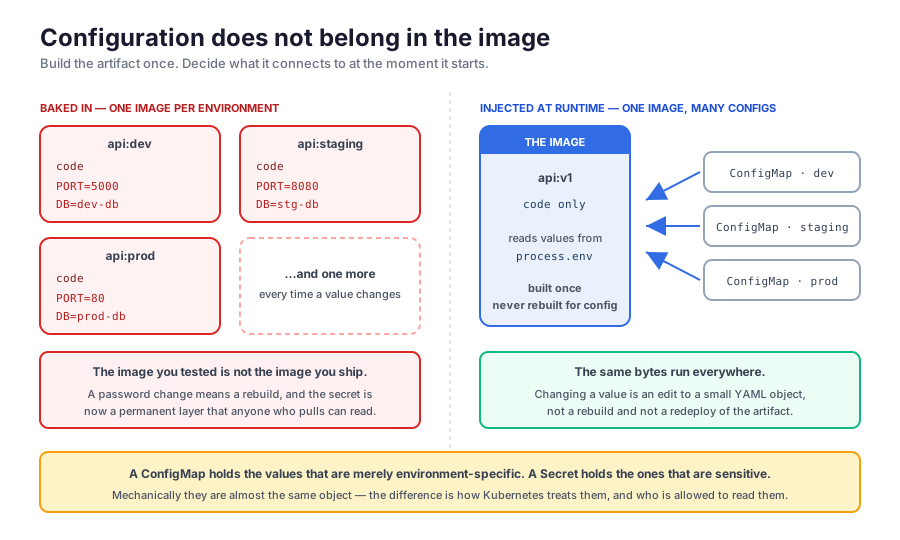
If you’ve used a .env file locally, you’ve already accepted this idea. ConfigMaps and Secrets are just where those values live once there’s no filesystem to keep them on and no single machine to keep them for.
2. The app we’ll configure
To watch values actually land, we need an app that does nothing but report what it was given. Here’s the whole thing — an Express server that prints two environment variables and serves them back:
import express from "express";

const app = express();

console.log(process.env.DATABASE_URL)
console.log(process.env.PORT)

app.get("/", (req, res) => {
  return res.json({
    db: process.env.DATABASE_URL,
    port: process.env.PORT
  })
})

app.listen(process.env.PORT)
Note what’s not there: no Kubernetes client, no config library, no awareness that a cluster exists. It reads process.env exactly like it would on your laptop. That’s the point — nothing in this post requires your application to be Kubernetes-aware.
The Dockerfile is equally ordinary:
FROM oven/bun:1

WORKDIR /app

COPY package*.json ./

RUN bun install

COPY . .

CMD ["bun", "index.ts"]
I’ve built and pushed this image already, so you can follow along without building anything:
dheerajsai15/test-kub:v1If you’d rather build your own, it’s docker build -t <you>/test-kub:v1 . and docker push <you>/test-kub:v1 — just substitute your image name everywhere below.
Two details worth noticing before we go on, because both matter later:
app.listen(process.env.PORT)— with no fallback. IfPORTisn’t set, this app doesn’t start. That’s deliberate here; it means a misconfigured ConfigMap produces a visibly broken pod instead of a silently wrong one.- The
console.loglines run once, at startup. Sokubectl logsshows us the values the process was born with — which turns out to be exactly the right lens for the gotcha in section 5.
We’re back on a local Kind cluster from Part 2 for this post — nothing here needs a cloud provider or costs money:
kind create cluster --name k8s-part53. Creating a ConfigMap
A ConfigMap is about as simple as Kubernetes objects get: a name, and a data map of key-value pairs. Save this as configmap.yaml:
apiVersion: v1
kind: ConfigMap
metadata:
  name: backend-config
data:
  PORT: "5000"
  APP_NAME: "billing-api"
  LOG_LEVEL: "debug"
apiVersion: v1 — ConfigMaps are core objects, like Pods and Services, not a separate API group like Ingress was.
The quotes around "5000" aren’t decoration. ConfigMap values must be strings, and YAML would otherwise parse 5000 as a number and reject the object. This catches people constantly with ports, replica counts, and true/false flags — quote everything in data.
kubectl apply -f configmap.yaml
kubectl get configmap
NAME DATA AGE
backend-config 3 0s
kube-root-ca.crt 1 39sThree keys, as expected. (kube-root-ca.crt is Kubernetes’ own — every namespace gets one automatically so pods can verify the API server. Ignore it.)
kubectl describe shows the values in full:
kubectl describe configmap backend-configName: backend-config
Namespace: default
Data
====
APP_NAME:
----
billing-api
LOG_LEVEL:
----
debug
PORT:
----
5000Everything in plain sight — remember this output when we get to Secrets, because that’s precisely where the two objects part ways.
There’s also an imperative form, handy for quick experiments:
kubectl create configmap backend-config \
  --from-literal=PORT=5000 \
  --from-literal=APP_NAME=billing-api
and one that reads an existing file, which is the fastest way to migrate a .env you already have:
kubectl create configmap backend-config --from-env-file=.envI’ll stick to YAML files for the rest of this post. Imperative commands are great for poking at a cluster, but a file is the thing you commit, review, and re-apply — the same reason we’ve written manifests for everything since Part 2.
4. Wiring it into the Deployment
A ConfigMap on its own does nothing at all — same lesson as the Ingress object in Part 4. Something has to reference it. Save as deployment.yaml:
apiVersion: apps/v1
kind: Deployment
metadata:
  name: backend
spec:
  replicas: 1
  selector:
    matchLabels:
      app: backend
  template:
    metadata:
      labels:
        app: backend
    spec:
      containers:
        - name: backend
          image: dheerajsai15/test-kub:v1
          ports:
            - containerPort: 5000
          env:
            - name: PORT
              valueFrom:
                configMapKeyRef:
                  name: backend-config
                  key: PORT
The Deployment is the same shape as Part 2’s. The new part is the env entry. Compare it to what we wrote in Part 3:
env:
  - name: PORT
value: "5000" # the value, written hereenv:
- name: PORT
valueFrom: # a pointer to where the value lives
configMapKeyRef:
name: backend-config
key: PORTvalue is a literal; valueFrom is a reference. The manifest now says where to look, and the value itself isn’t in this file at all — which is the property that makes it committable.
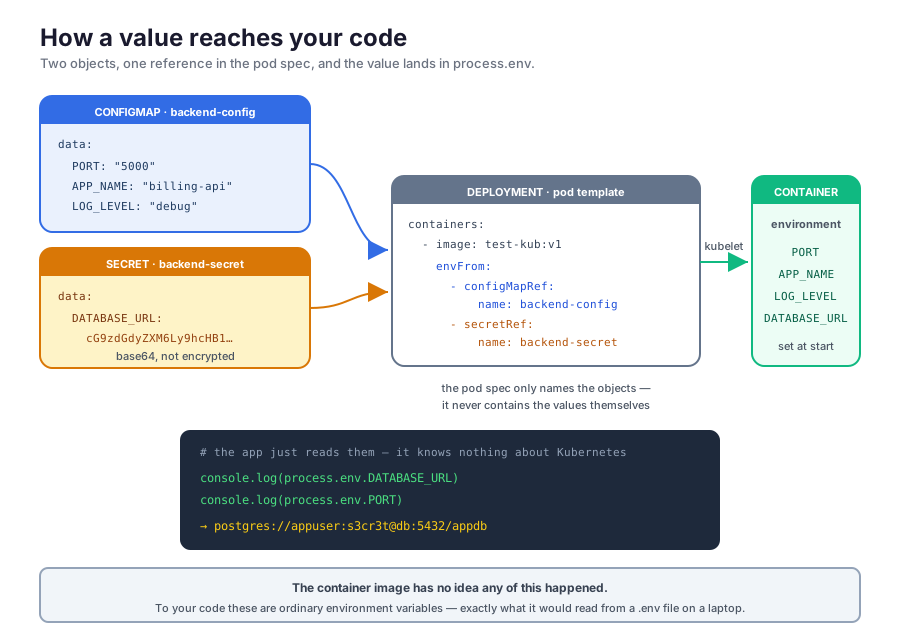
Read configMapKeyRef as two lookups: name picks the ConfigMap, key picks the entry inside it. And note the environment variable name (name: PORT, the outer one) is independent of the key name — you can expose PORT to a container that expects SERVER_PORT just by changing the outer name. That indirection is useful when an off-the-shelf image demands a variable name you don’t like.
kubectl apply -f deployment.yaml
kubectl get pods -l app=backend
NAME READY STATUS RESTARTS AGE
backend-6f876b6fd8-r9dl2 1/1 Running 0 25sRunning. Now the payoff — what did the process actually see?
kubectl logs -l app=backendundefined
5000There it is. The second line is PORT, and it’s 5000 — that value travelled from a YAML file, through etcd, into the kubelet, into the container’s environment, and out of console.log. We never touched the image.
The first line is DATABASE_URL, and it’s undefined, because we haven’t given it one. That’s the Secret’s job.
The bulk form
Naming three variables one at a time gets tedious fast. envFrom imports an entire ConfigMap, using each key as a variable name:
          envFrom:
            - configMapRef:
                name: backend-config
Replace the whole env: block with that, re-apply, and check inside the container:
kubectl exec deploy/backend -- printenv PORT APP_NAME LOG_LEVEL5000
billing-api
debugAll three, no per-key wiring. This is why the keys in section 3 were named in SCREAMING_SNAKE_CASE — with envFrom the key becomes the variable name, so it has to be a legal one.
envFrom is the common choice in practice. Reach for the explicit configMapKeyRef form when you need to rename a variable, or when you want only one key out of a large ConfigMap.
When the reference is wrong
Worth seeing once, because the failure is distinctive. Point a configMapKeyRef at a key that doesn’t exist and apply it:
NAME     READY   STATUS                       RESTARTS   AGE
broken   0/1     CreateContainerConfigError   0          12s
CreateContainerConfigError — the image pulled fine, but the kubelet couldn’t assemble the container’s configuration, so it never started it. kubectl describe pod names the culprit exactly:
Warning Failed 3s kubelet Error: couldn't find key NOPE in ConfigMap default/backend-configNote that kubectl apply accepted this manifest without complaint. The API server only validates that your YAML is well-formed; whether the ConfigMap key exists is discovered later, by the kubelet, on the node. Same pattern as a mistyped image name — the object is valid, the world just doesn’t match it.
5. The gotcha: editing a ConfigMap does not update running pods
This one bites everybody once. Change LOG_LEVEL:
kubectl patch configmap backend-config --type merge -p '{"data":{"LOG_LEVEL":"warn"}}'
kubectl get configmap backend-config -o jsonpath='{.data.LOG_LEVEL}'warnThe ConfigMap is updated. Now ask the running pod:
kubectl exec deploy/backend -- printenv LOG_LEVELdebugStill the old value. Nothing is broken — this is exactly how environment variables work everywhere. A process’s environment is handed to it once, by whatever started it, at the moment it starts. Nothing on Earth can reach into a running process and change it afterwards; the kubelet is no exception. Our pod was born when LOG_LEVEL was debug, and it will believe that until it dies.
There’s no kubectl reload. What you want is new pods, which means a rollout:
kubectl rollout restart deployment/backend
kubectl rollout status deployment/backend
Waiting for deployment "backend" rollout to finish: 1 old replicas are pending termination...
deployment "backend" successfully rolled outkubectl exec deploy/backend -- printenv LOG_LEVELwarnrollout restart performs the same rolling replacement as a version bump from Part 2 — new pods up, old pods drained — except the image is unchanged. It exists more or less for this exact situation.
So the rule to keep: a config change is a two-step operation. Apply the ConfigMap, then restart what consumes it. If you forget the second step, you’ll be debugging an app that insists it’s using a value you can plainly see is no longer there. (There’s an exception involving mounted files, which we’ll get to in section 8.)
6. Secrets, and the thing everyone gets wrong
PORT and LOG_LEVEL in a ConfigMap are fine — they’re environment-specific, not sensitive. DATABASE_URL contains a password, and that’s a different category of value. Kubernetes has a separate object for it.
Mechanically, a Secret is almost the same object as a ConfigMap, with one visible difference: the values are base64-encoded. Encode ours:
printf 'postgres://appuser:s3cr3t@db:5432/appdb' | base64cG9zdGdyZXM6Ly9hcHB1c2VyOnMzY3IzdEBkYjo1NDMyL2FwcGRiUse printf, or echo -n. Plain echo appends a newline, and that newline gets encoded right along with your password:
echo 'postgres://appuser:s3cr3t@db:5432/appdb' | base64cG9zdGdyZXM6Ly9hcHB1c2VyOnMzY3IzdEBkYjo1NDMyL2FwcGRiCg==Different string, and the extra Cg== on the end is that newline. Your app then tries to connect with a password that has an invisible character glued to it, gets rejected, and you spend an afternoon on it. It’s the single most common Secrets mistake, and now you won’t make it.
Save as secret.yaml:
apiVersion: v1
kind: Secret
metadata:
  name: backend-secret
type: Opaque
data:
  DATABASE_URL: cG9zdGdyZXM6Ly9hcHB1c2VyOnMzY3IzdEBkYjo1NDMyL2FwcGRi
type: Opaque just means “arbitrary user-defined data” — the default, and what you want here.
kubectl apply -f secret.yaml
kubectl describe secret backend-secret
Name: backend-secret
Namespace: default
Type: Opaque
Data
====
DATABASE_URL: 39 bytesCompare that to the ConfigMap’s describe from section 3, which printed every value in full. Here kubectl reports the size and refuses to print the value. That’s a genuinely useful property — it means secrets don’t end up in your terminal scrollback or a screen-share by accident.
But it is only a display convention, and this is the part to be clear-eyed about.
Why base64, and why it protects nothing
Why base64 at all? Not for secrecy. A Secret can hold binary files — a certificate, a private key — and YAML can only hold text. Base64 re-spells any file using 64 characters that are safe everywhere (A–Z, a–z, 0–9, +, /) so it can travel as text. It’s the same trick email uses to send a photo through a text-only protocol — that blob of letters is encoded, not encrypted, and so is your Secret.
And why does it protect nothing? Because decoding requires no key, no password, and no secret of any kind. That’s what distinguishes encoding from encryption: encryption takes a key, and without the key you’re stuck; encoding is a reversible transformation that anyone can undo. The full attack is one command:
kubectl get secret backend-secret -o jsonpath='{.data.DATABASE_URL}' | base64 -dpostgres://appuser:s3cr3t@db:5432/appdb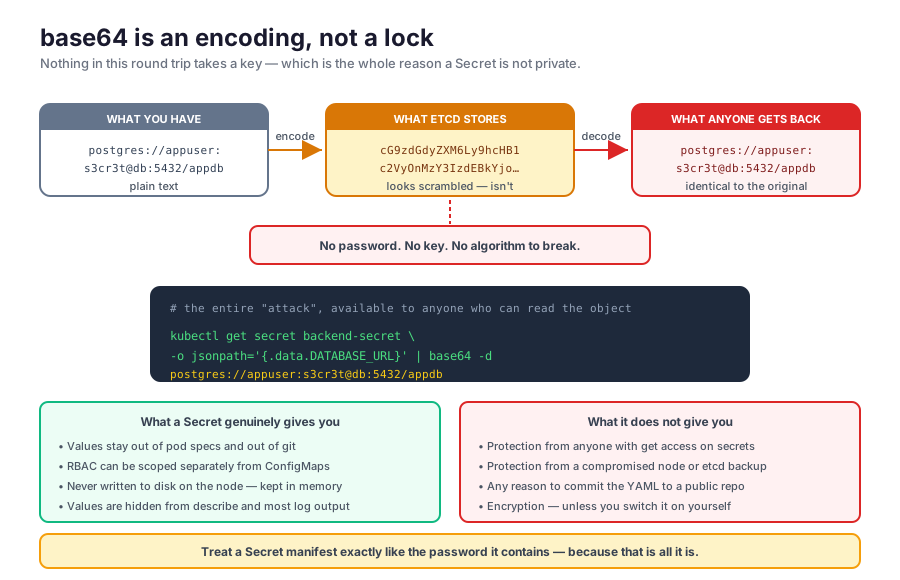
There’s a convenience feature that makes the point better than any explanation. stringData lets you write plain text and have Kubernetes encode it for you:
apiVersion: v1
kind: Secret
metadata:
  name: backend-secret
type: Opaque
stringData:
  DATABASE_URL: "postgres://appuser:s3cr3t@db:5432/appdb"
Apply it and read back what’s stored:
kubectl get secret backend-secret -o jsonpath='{.data.DATABASE_URL}'cG9zdGdyZXM6Ly9hcHB1c2VyOnMzY3IzdEBkYjo1NDMyL2FwcGRiByte-for-byte identical to the hand-encoded version. stringData is write-only sugar — the object always ends up the same. If base64 were a security measure, Kubernetes would hardly offer to do it for you on request.
The practical consequence: a Secret manifest is as sensitive as the password inside it. Don’t commit it to git. Don’t paste it in a ticket. kubectl apply -f secret.yaml and then treat that file the way you’d treat the raw password — because it is the raw password, wearing a hat.
So what is a Secret actually good for?
- The value is out of your pod specs, so your Deployment YAML — the file that genuinely does live in git — no longer contains a password.
- RBAC treats them as a separate resource kind. You can grant a team read access to ConfigMaps across a namespace while denying it on Secrets. That’s the actual security boundary, and it’s the one to invest in.
- They aren’t written to disk on the node. When mounted, the kubelet keeps a Secret in a
tmpfs— memory only — so it doesn’t linger on a disk that might later be imaged or discarded. - They’re only sent to nodes that need them. A Secret is delivered to a node when a pod there references it, rather than being distributed cluster-wide.
- Tooling knows to be careful with them. The
describebehaviour above is one example; managed logging and audit pipelines generally redact them too.
And what it doesn’t buy you: protection from anyone who can get secrets in that namespace, from someone who compromises a node, or from an unencrypted etcd backup sitting in object storage. If you want the values encrypted at rest, that’s a separate thing you turn on — encryption at rest on the API server, or an external manager like HashiCorp Vault, AWS Secrets Manager, or the External Secrets Operator, which syncs values in from one of those. The teaching version is what we’re doing here; the production version usually has one of those behind it.
Check what you’re allowed to do with:
kubectl auth can-i get secretsyesYou’re cluster admin on a Kind cluster, so of course. On a shared cluster, that command against various namespaces is how you find out what the boundary actually is.
7. Using both together
Now the complete picture. Our app needs PORT from the ConfigMap and DATABASE_URL from the Secret, and envFrom takes a list, so both go in:
apiVersion: apps/v1
kind: Deployment
metadata:
  name: backend
spec:
  replicas: 1
  selector:
    matchLabels:
      app: backend
  template:
    metadata:
      labels:
        app: backend
    spec:
      containers:
        - name: backend
          image: dheerajsai15/test-kub:v1
          ports:
            - containerPort: 5000
          envFrom:
            - configMapRef:
                name: backend-config
            - secretRef:
                name: backend-secret
The only difference between the two entries is configMapRef versus secretRef. Everything else — how they’re referenced, how they become environment variables, when they’re evaluated — is identical. That symmetry is the thing to take away: as far as your container is concerned, there is no difference at all between a value from a ConfigMap and a value from a Secret. The distinction exists for the humans and the access-control system, not for the process.
There’s a per-key form too, mirroring configMapKeyRef exactly:
          env:
            - name: DATABASE_URL
              valueFrom:
                secretKeyRef:
                  name: backend-secret
                  key: DATABASE_URL
Apply and look:
kubectl apply -f deployment.yaml
kubectl rollout status deployment/backend
kubectl logs -l app=backend
postgres://appuser:s3cr3t@db:5432/appdb
5000Both lines populated. Compare that to section 4, where the first line read undefined. Let’s confirm the app is really serving them rather than just logging at boot:
kubectl port-forward deploy/backend 5000:5000curl http://localhost:5000/{"db":"postgres://appuser:s3cr3t@db:5432/appdb","port":"5000"}That’s the whole chapter working end to end. A password lives in a Secret, a port lives in a ConfigMap, neither is in the image, neither is in the Deployment, and the app reads both as ordinary environment variables without knowing Kubernetes exists.
Notice the password is plainly visible in that response — because our demo app deliberately prints it. Yours shouldn’t. Printing secrets to logs or HTTP responses is how they end up in log aggregators, error trackers, and screenshots, and it defeats every protection in the previous section.
8. Mounting as files instead
Environment variables aren’t the only option. Both objects can be mounted as files in the container’s filesystem, which is what you want for anything file-shaped — TLS certificates, SSH keys, an nginx.conf, a service-account JSON — and increasingly the preferred choice even for plain values.
Add a volume and a mount:
          volumeMounts:
            - name: secret-files
              mountPath: /app/secrets
              readOnly: true
      volumes:
        - name: secret-files
          secret:
            secretName: backend-secret
The two-part structure is the same one we’ll see again with persistent storage: volumes (at pod level) declares what the volume is, and volumeMounts (inside a container) declares where that volume appears. Splitting it that way is what lets two containers in the same pod mount the same volume at different paths.
kubectl apply -f deployment.yaml
kubectl exec deploy/backend -- ls -l /app/secrets
lrwxrwxrwx 1 root root 19 Aug 9 13:06 DATABASE_URL -> ..data/DATABASE_URLEach key became a file, named after the key, containing the value — decoded, not base64:
kubectl exec deploy/backend -- cat /app/secrets/DATABASE_URLpostgres://appuser:s3cr3t@db:5432/appdbYour app never sees base64. It was a storage format at the API layer and nothing more.
That -> in the listing isn’t clutter, by the way — it’s the mechanism for what happens next. The files are symlinks into a hidden ..data directory, and when the Secret changes, the kubelet writes a whole new directory and atomically re-points that one symlink. You never observe a half-written file.
Files update. Environment variables don’t.
Here’s where the two consumption styles genuinely diverge. Our pod above consumes DATABASE_URL both ways — as an env var via envFrom, and as a file via the mount. Rotate the password without restarting anything:
kubectl patch secret backend-secret \
  -p '{"stringData":{"DATABASE_URL":"postgres://appuser:ROTATED@db:5432/appdb"}}'
Watch the file for a minute or so:
kubectl exec deploy/backend -- cat /app/secrets/DATABASE_URLpostgres://appuser:ROTATED@db:5432/appdbIt changed on its own. Now the environment variable, in that same pod:
kubectl exec deploy/backend -- printenv DATABASE_URLpostgres://appuser:s3cr3t@db:5432/appdbStill the old value — and the pod’s restart count is 0, so nothing was recreated. One running container, one Secret, two different answers depending on how you ask.
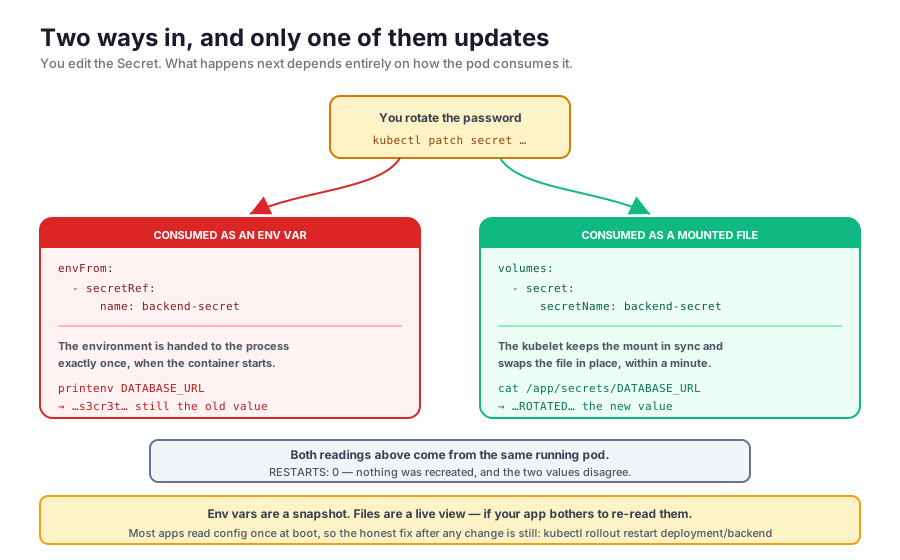
The update isn’t instant — the kubelet refreshes mounts on a sync interval, so expect up to about a minute. And the honest caveat: a file being current doesn’t mean your app noticed. Most applications read their config once at startup and hold it in memory, so unless you’ve specifically written it to re-read the file (or watch it), you’re back to needing kubectl rollout restart anyway. Live-updating mounts are a real advantage, but only for software built to take advantage of them.
Two reasons to prefer file mounts regardless of that:
- Environment variables leak more easily. They’re visible in
kubectl describe pod, inherited by every child process, and routinely dumped into crash reports and error trackers. - They’re the only sane option for anything multi-line or binary — a certificate in an env var is miserable.
A ConfigMap mounts identically; swap secret: { secretName: ... } for configMap: { name: ... }. That’s the usual way to hand a config file to an off-the-shelf image, and how the ingress controller in Part 4 got its own configuration.
Wrapping up
Where we landed:
- Configuration belongs outside the image. One artifact, built once, that reads its values from the environment at startup.
- A ConfigMap is a named map of string values, for non-sensitive, environment-specific configuration. Reference it with
configMapKeyReffor one key, orenvFromfor all of them. - A Secret is mechanically the same object with base64-encoded values, for sensitive ones. Reference it with
secretKeyReforenvFrom. Your container can’t tell the difference. - Base64 is an encoding, not encryption. One
base64 -dundoes it, with no key. A Secret keeps values out of your manifests and lets RBAC gate them separately; it does not hide them from anyone who can read the object. Treat the manifest as the password itself, and add encryption at rest or an external secret manager when it matters. - Environment variables are a snapshot taken at container start. Editing a ConfigMap or Secret changes nothing until new pods exist —
kubectl rollout restart deployment/<name>. - Mounted files are the alternative: each key becomes a file, the values arrive decoded, and the kubelet keeps the mount in sync with the object — though your app still has to bother re-reading it.
Clean up:
kubectl delete deployment backend
kubectl delete configmap backend-config
kubectl delete secret backend-secret
Or just delete the cluster, since it’s only Kind — no cloud bill waiting for you this time:
kind delete cluster --name k8s-part5That’s configuration handled. The other half of what we flagged at the end of Part 4 is still open, and it’s the bigger one: every pod we’ve built has been disposable. The postgres pod from Part 3 would lose its entire database the moment it was rescheduled, which is a slightly awkward property for a database. Part 6 fixes that with volumes, PersistentVolumes, and PersistentVolumeClaims.